I Asked AI to Change One Thing. Why Did It Change Everything?
AI can make an impressive image and still change things you wanted left alone. Understanding why makes it easier to get better edits and recognise when another tool might be the better choice.
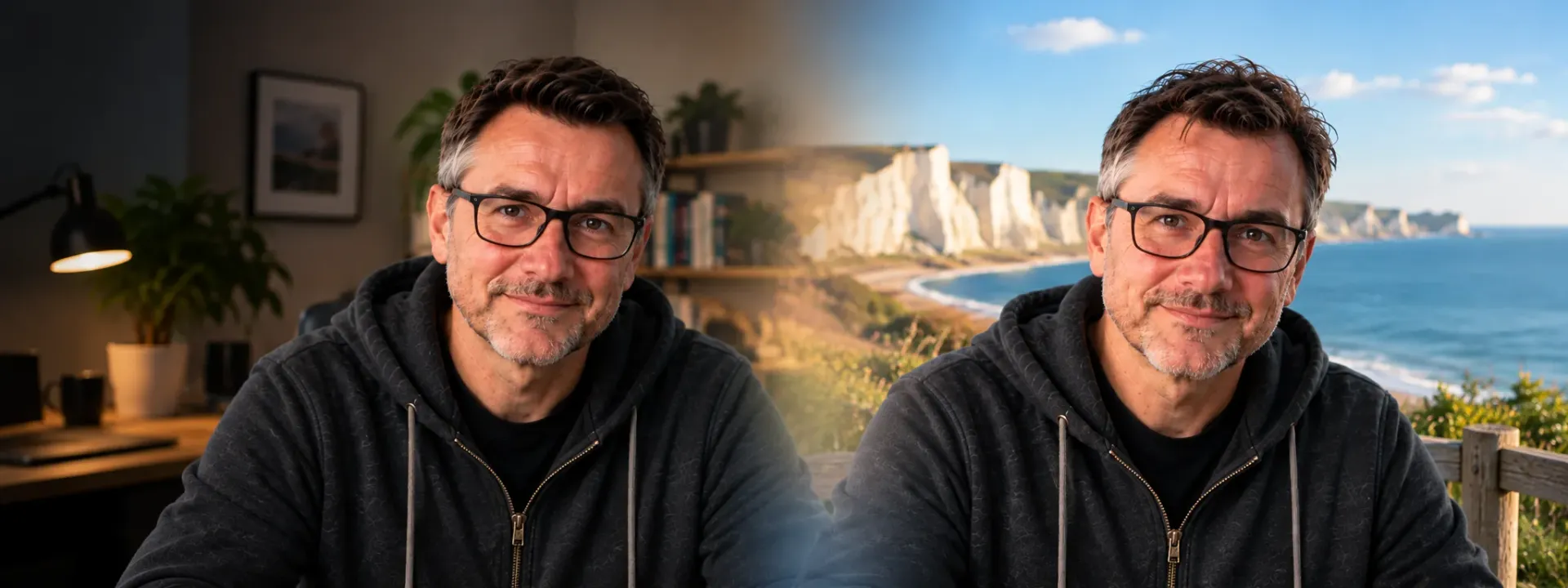
You upload a photograph to an AI image tool and ask for what seems like a small change.
The result comes back and the office looks good. The clutter has gone. The lighting is better. Your shirt somehow looks smarter.
Then you look at your face.
Something is off. Your hair has moved. Your glasses are slightly different. Your smile has changed. There may even be an extra button on your jacket that was definitely not there before.
You asked AI to change the background. It seems to have taken the opportunity to reconsider the rest of the photograph as well.
One thing has made a real difference for me: when editing an existing image, telling AI what not to change can be just as important as telling it what you do want changed.
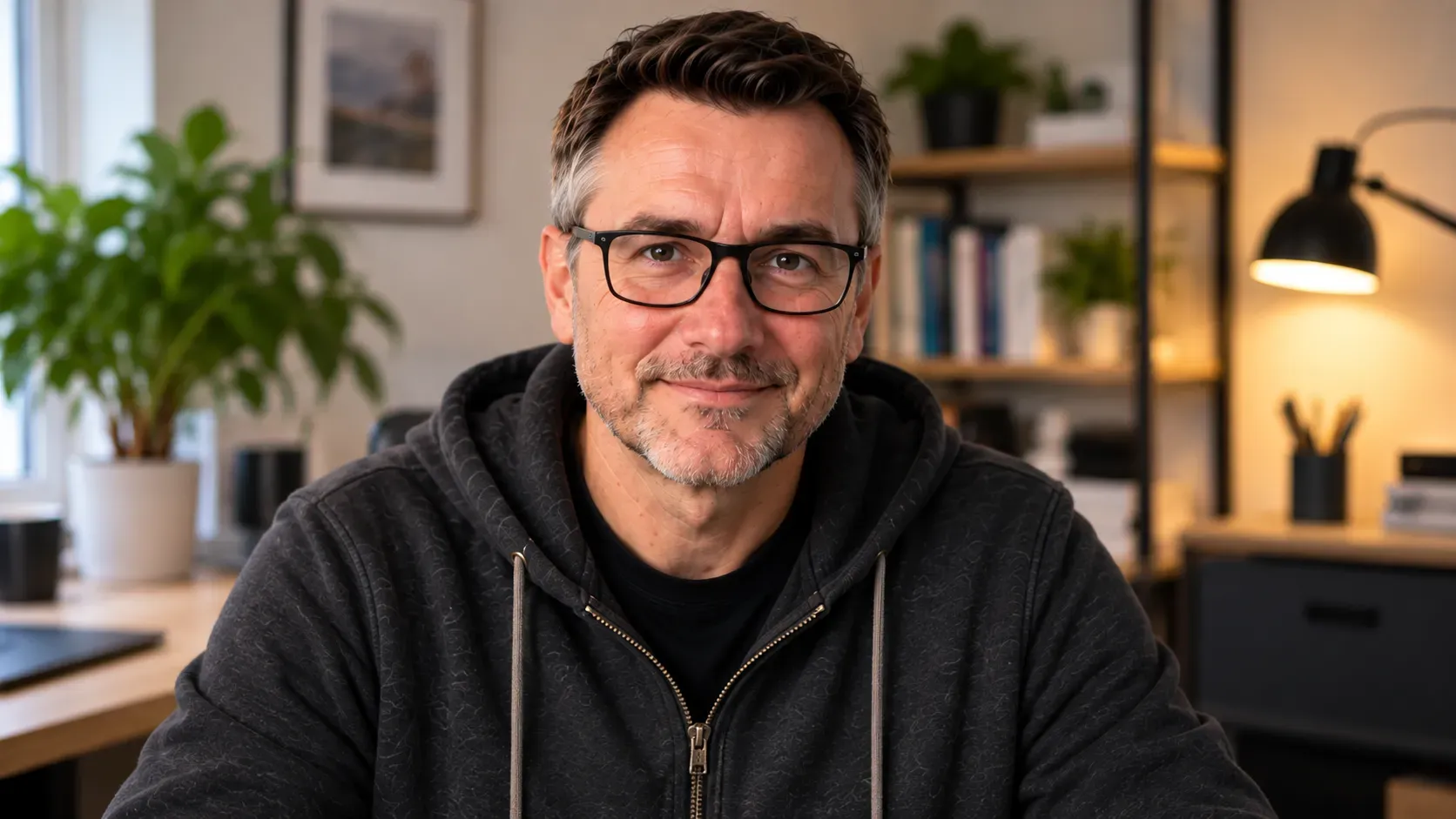
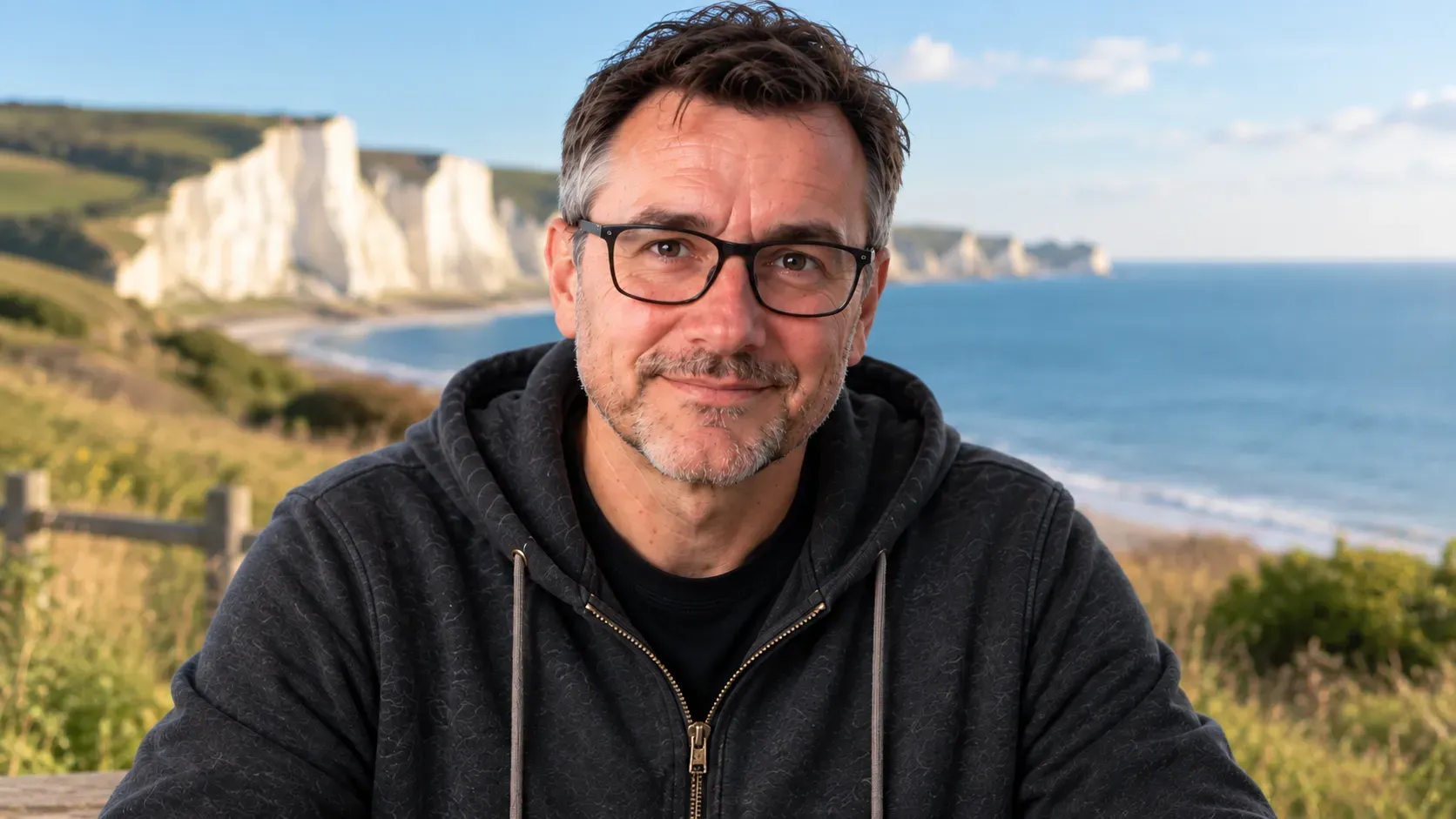 Original
AI edit
Original
AI edit
The frame is slightly different.
The shape and hairline have shifted.
The smile is not quite the same.
Small details and proportions have drifted.
Why does AI change things you never asked it to touch?
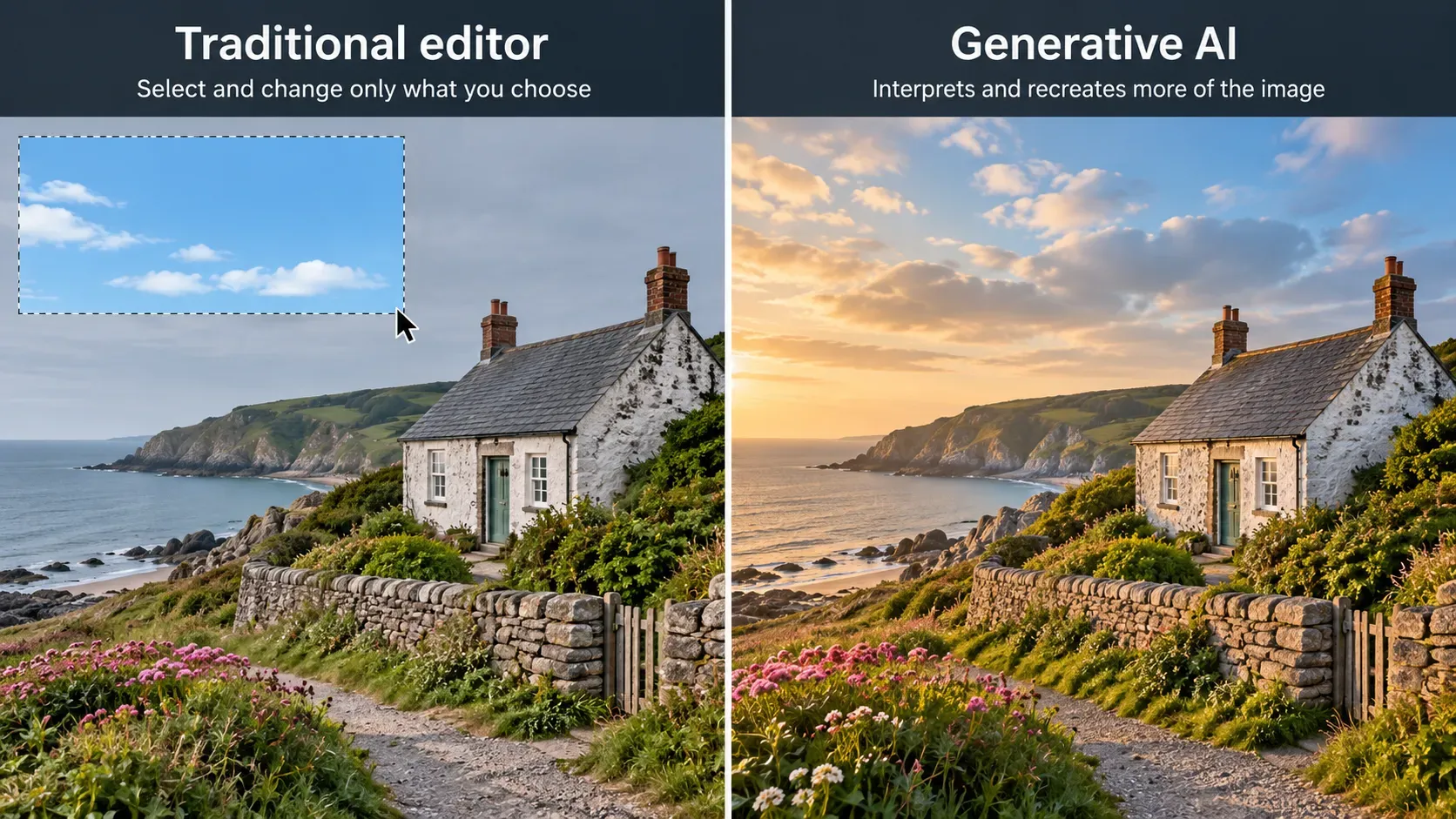
A traditional photo editor can be very precise.
Select a wall. Change its colour. Leave the person standing in front of it alone.
Generative AI can behave differently. Depending on the tool and the edit, it may recreate parts of the picture while producing the new result.
That can be helpful. If you move somebody from a dim room into bright sunshine, the lighting on the person may need to change or the finished image could look pasted together.
The trouble starts when the AI goes further than you wanted.
Change a kitchen wall and a cupboard moves. Remove somebody from a group photograph and the person beside them changes slightly. Adjust the lighting around a face and you get a face that looks very similar to the original, but not quite the same.
A convincing image and an accurate edit are not always the same thing.
Say what to change and what not to change
This is the part I would remember if you take nothing else from this article.
Replace the background with a simple modern office.
Keep the face, hair, glasses, clothes, pose and body proportions unchanged.
Most of that second instruction is not describing the new image. It is protecting the original.
Sometimes AI is guessing because we made it guess
There is another side to this, and I have caught myself doing it plenty of times.
I know what I want the image to look like. Or at least I think I do.
Then I type something vague and expect the AI to fill in everything I have left out.
I treat it a bit like briefing a graphic designer
If I told a graphic designer simply to “make this better”, I would expect questions.
What is the image for? What should people notice first? What sort of feel am I after? What has to stay exactly as it is? What do I definitely not want changed?
Those questions help because they force me to explain the parts I have left in my head.
You can make AI do the same thing.
Get AI to interview you first
Bigger edits give the AI more choices
“Put me on a beach” sounds like one change.
It probably is not.
The original light may have come from an office window. The beach has bright sunlight. Carpet becomes sand. The colours around you change. Your pose may not quite fit the new setting.
The AI has to make decisions about how all of that fits together.
Some of those decisions improve the result. Each one also gives the model another opportunity to change something you wanted left alone.
If the original person or object really matters, smaller steps can be easier to control.
A few visual words can help
Sometimes a prompt feels difficult simply because you do not know the word for the look you want.
You do not need to become a photographer or designer, but a little visual language goes a long way.
Terms such as framing, composition, perspective, depth of field and colour palette are not secret AI commands. They are normal ways photographers, artists and designers describe images.
Find an image prompt in the Nova9 Prompt Library
If you would rather start with a prompt and adapt it, the Nova9 Prompt Library has practical prompts you can copy, change and use with your preferred AI tool.
Explore the Prompt LibraryTry another model before you rewrite the prompt ten times
AI image tools do not all behave the same way.
You can give the same photograph and the same instruction to different models and get noticeably different results.
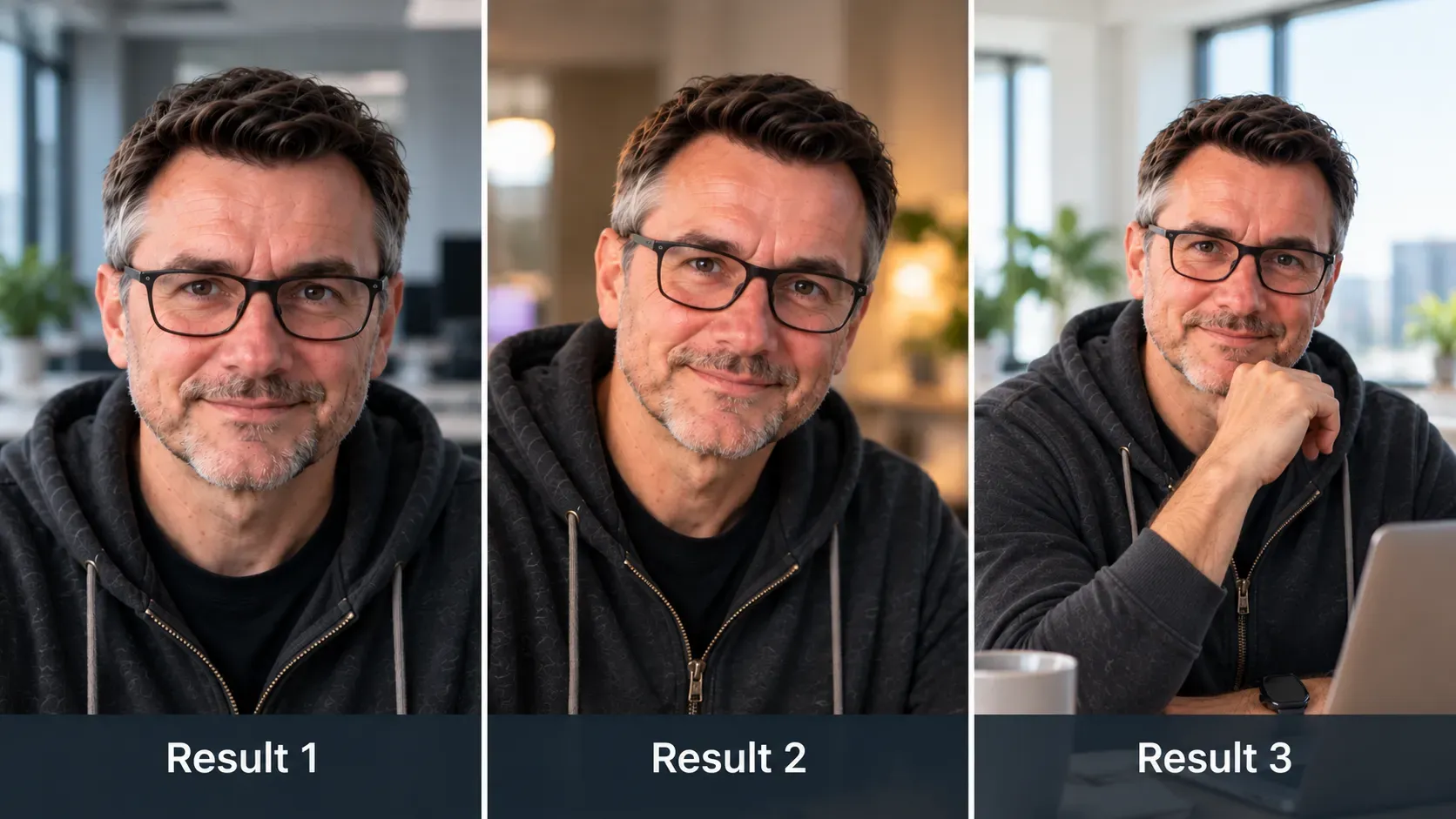
If the same problem keeps happening, I do not automatically assume my prompt needs another paragraph added to it. Sometimes I try the same job somewhere else.
My own choice has changed over time. Gemini used to be the image tool I reached for first. More recently, ChatGPT has felt more complete for the way I work, particularly when I want to discuss the idea, refine the brief and then create or edit the image in the same conversation.
That is my experience now. It is not a permanent ranking.
Keep testing because the models keep changing
The companies making these tools are competing, features improve and a job that produced poor results a few months ago may work much better after a model update.
Keep useful prompts. Keep the original image.
If a new model arrives, try an old task again.
Do not assume that because AI could not do something well last time, it still cannot do it.
Keep testing.
Different tools can also draw the line in different places
You may find that one AI service accepts an image or edit and another refuses it.
Different services have their own rules about what they will create or alter, and those rules can differ.
A refusal does not automatically mean there is something wrong with your prompt.
It may simply be an edit that particular service will not do.
Should you keep trying with AI?
Choose the situation closest to yours.
And sometimes I stop using AI altogether
Sometimes you can keep prompting and still not get the edit you need.
You make the instruction clearer. You explain what should change. You explain what must stay unchanged. You try a smaller edit. You try another model.
The face still changes. The logo still gets damaged. The object you need preserved still moves.
At that point, I would stop.
Adobe Photoshop, Affinity Photo or another traditional editor may simply be the better tool.
The aim is the image you need, not proving that AI can do every part of the job.
Check the image, not just whether it looks good
Tap each item as you compare the edit with the original.
Better image prompting is partly about setting boundaries
Tell AI what you want changed, but be just as clear about what matters enough to leave alone.
If the picture in your head is difficult to explain, get the AI to ask you questions. Try another model when the result is not working, and try old tasks again as the models improve.
If you are still fighting the image after several sensible attempts, use a more precise editor.
Say what not to change.
Keep testing.
Know when to use another tool.